---
title: 'Softr Isn''t Just an Airtable Front End Anymore'
description: 'Softr is no longer just an Airtable front end. A full contract manufacturing portal built on Softr databases, workflows, AI steps, vibe-coded pages, Gamma proposals and Stripe payments.'
canonical_url: 'https://www.business-automated.com/tutorials/softr-database-workflows-vibe-coding'
md_url: 'https://www.business-automated.com/tutorials/softr-database-workflows-vibe-coding.md'
last_updated: 2026-09-17
---
Looking at the Aurora Labs website, you would not guess it was built with Softr. It looks like a landing page from Lovable, or something vibe coded in Claude Code. It is neither — it is a Softr page, and the entire business behind it runs in the same app.
That is the thing worth updating your mental model on. If you know [Softr](/tools/softr) as the front-end portal builder for [Airtable](/tools/airtable), you are roughly two years out of date. Softr today is an end-to-end package: its own database, automation workflows with AI steps inside them, the page builder you already know, and a vibe coding block that generates custom sections from a prompt and then hands you a settings panel to edit them.
This tutorial walks through a complete system for a cosmetics contract manufacturer built entirely on that stack — public site, quote request form, AI request triage, quote building against a price list, a proposal deck generated through Gamma, a customer portal for approval, and a Stripe payment at the end.
## Video Tutorial
### What is in the video
- [1:32 — The landing page is a Softr app](https://youtu.be/T-gSpVMO7QQ?t=92), block by block
- [1:55 — The vibe coding block](https://youtu.be/T-gSpVMO7QQ?t=115) and connecting data sources to it
- [2:42 — The settings panel](https://youtu.be/T-gSpVMO7QQ?t=162) that lets non-technical people edit a generated block
- [3:46 — Linking a vibe-coded button](https://youtu.be/T-gSpVMO7QQ?t=226) to a standard Softr form
- [4:13 — Multi-step conditional forms](https://youtu.be/T-gSpVMO7QQ?t=253), validation and field types
- [5:52 — Workflows](https://youtu.be/T-gSpVMO7QQ?t=352): the automation layer and its run history
- [6:44 — The AI spam check](https://youtu.be/T-gSpVMO7QQ?t=404) on incoming requests
- [7:41 — Assigning the least busy account manager](https://youtu.be/T-gSpVMO7QQ?t=461) with a JavaScript step
- [9:55 — AI structured output](https://youtu.be/T-gSpVMO7QQ?t=595) turning free text into quote line items
- [10:31 — The Softr database](https://youtu.be/T-gSpVMO7QQ?t=631) behind the whole system
- [11:04 — The admin portal](https://youtu.be/T-gSpVMO7QQ?t=664): work queues, requests and Ask AI
- [12:36 — Quote lines priced from the standard price list](https://youtu.be/T-gSpVMO7QQ?t=756), edited inline
- [13:37 — Generating the proposal PDF](https://youtu.be/T-gSpVMO7QQ?t=817)
- [13:52 — The Gamma template](https://youtu.be/T-gSpVMO7QQ?t=832) with per-slide instructions
- [15:01 — The custom API call to Gamma](https://youtu.be/T-gSpVMO7QQ?t=901) inside the workflow
- [17:35 — The customer portal](https://youtu.be/T-gSpVMO7QQ?t=1055): reviewing and approving the quote
- [19:27 — Paying with Stripe](https://youtu.be/T-gSpVMO7QQ?t=1167) and the order going to paid
## Key Takeaways
- **Softr is a full stack now.** Database, workflows, AI steps, permissions, payments and the page builder sit in one product. Airtable is an option, not a requirement.
- **Vibe code the surface, not the process.** Generated blocks are excellent for landing pages and custom layouts. Forms, approvals, payments and background jobs belong in tested primitives.
- **A generated block still needs a settings panel.** The block exposes editable fields after it is built, so a client can change a headline without a prompt or a deploy.
- **Use small models for small jobs.** The spam check runs on Claude Haiku 4.5 because it is a yes/no judgement, not a reasoning task.
- **Structured output is where AI earns its place.** Free-text requirements become discrete line items — product, volume, packaging — so the quote is pre-built before a human opens it.
- **Custom API calls are the escape hatch.** The proposal deck is produced by Gamma because a workflow can POST to any API and bring the result back into the record.
- **Run history is the reason to automate here rather than in code.** Every workflow execution is logged step by step, which is what you need when a quote does not arrive.
## What Softr Actually Includes in 2026
| Layer | What it does | Where it shows up in this build |
| --- | --- | --- |
| Softr Databases | Native relational tables with linked records, formulas and views | Products, prices, requests, quotes, quote lines, orders, order lines, specs, documents |
| Data connectors | Airtable, Supabase, Google Sheets, HubSpot and more | Optional — the vibe coding block can read any connected source |
| Page builder blocks | Lists, detail pages, forms, charts, kanban, navigation | Admin portal, customer portal, request form |
| Vibe coding block | Chat-generated custom blocks with a settings panel and a code tab | The public Aurora Labs landing page |
| Workflows | Trigger, branch, code, AI, custom API, email, wait — with run history | Request intake, PDF generation, quote sending |
| AI steps | Model choice and structured output inside a workflow | Spam filtering, line item extraction |
| Users and permissions | Roles, record-level visibility, portal invitations | Managers see the queue, customers see only their own quotes |
| Payments | Stripe checkout tied to a record | Paying for an approved order |
The practical consequence is that a system like this no longer spans four tools with four bills and four failure points. For a broader comparison of the approaches, our [no-code vs vibe coding](/no-code-vs-vibe-coding) piece covers where each one earns its keep.
## The System We Built
Aurora Labs is a cosmetics contract manufacturer: brands come to them with a formula or an idea and leave with finished, filled, packaged product. The flow the portal has to support looks like this.
1. A prospect lands on the public site and submits a detailed quote request.
2. A workflow screens the request, assigns an account manager, and drafts the quote lines.
3. The account manager refines the quote in an internal portal, priced from a standard price list.
4. A button generates a branded proposal deck through Gamma and attaches it to the quote.
5. The customer reviews the proposal in their own portal, comments, and approves it.
6. Approval creates an order, the customer pays with Stripe, and fulfilment status becomes visible to both sides.
Every step below happens inside one Softr app.
## Part 1: The Landing Page Is a Vibe Coded Block
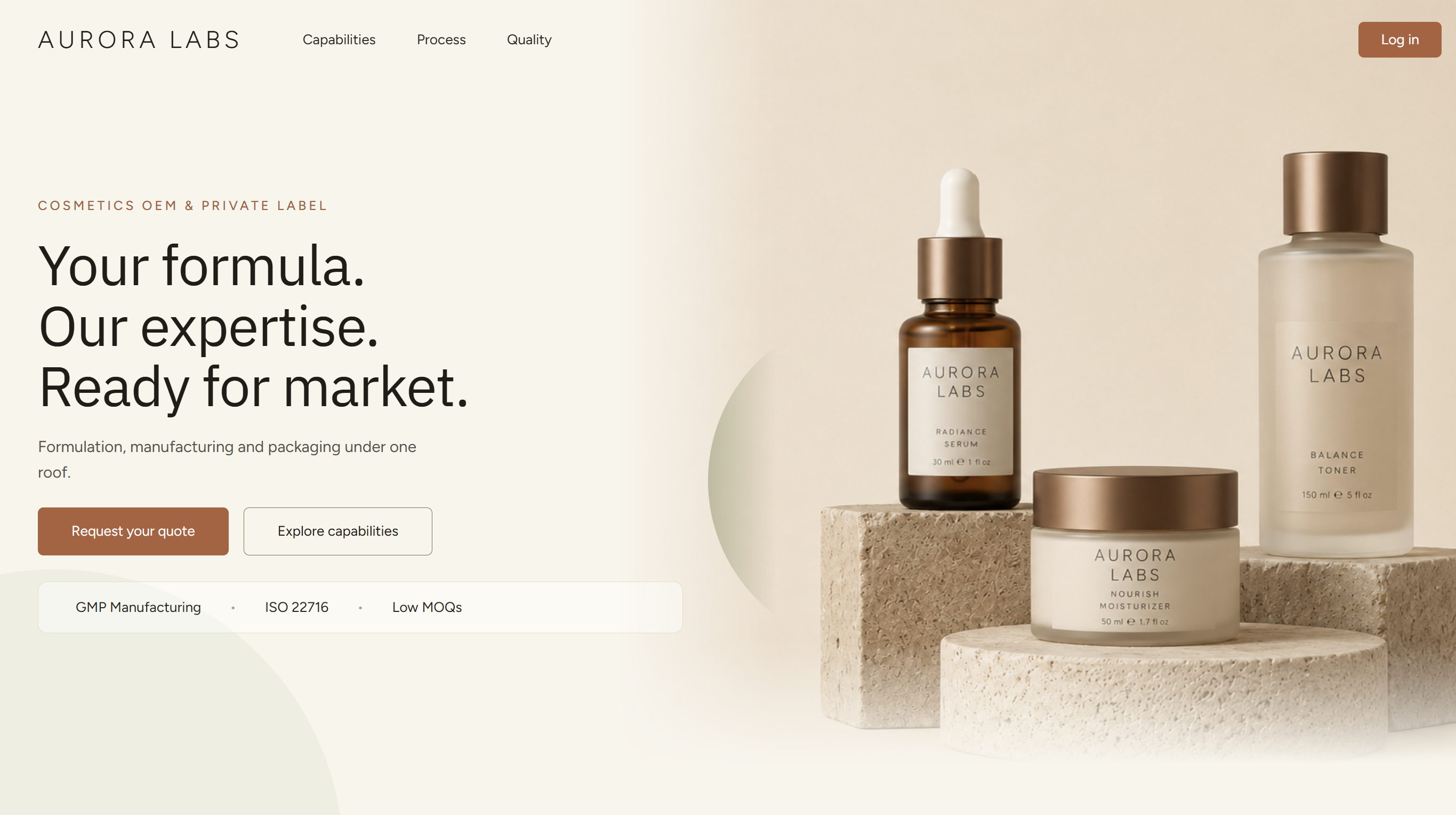
_The public site. Nothing about it says no-code tool — and the log-in button leads straight into the portal that runs the business._
Open the page in the builder and it is a normal Softr page made of blocks. The hero, the capabilities section and the rest are one block type that is new to most people: the **vibe coding block**.
You build it through a chat interface. Describe the section, it generates it, you refine it in conversation. Three details make this different from asking a chatbot for HTML:
**It can read your data.** The block can be connected to any data source in your app — a Softr database, Airtable, Supabase, or any other connector — so it renders live records instead of lorem ipsum. A generated pricing grid can be an actual pricing grid.
**It leaves behind a settings panel.** This is the part worth stealing. Once the block is finished, the sidebar shows ordinary input fields for its content — headings, body copy, button labels, images. A teammate or a client changes the hero headline by typing in a box, not by prompting an AI and hoping nothing else moves. Handing a generated page to a non-technical owner is usually the moment these projects fall apart; the settings panel is what prevents it.
**The code is still yours.** A code tab shows the generated source. You would not hand-edit it in that window, but you can copy it out, work on it in Claude or ChatGPT, and paste it back for anything the chat interface cannot express.
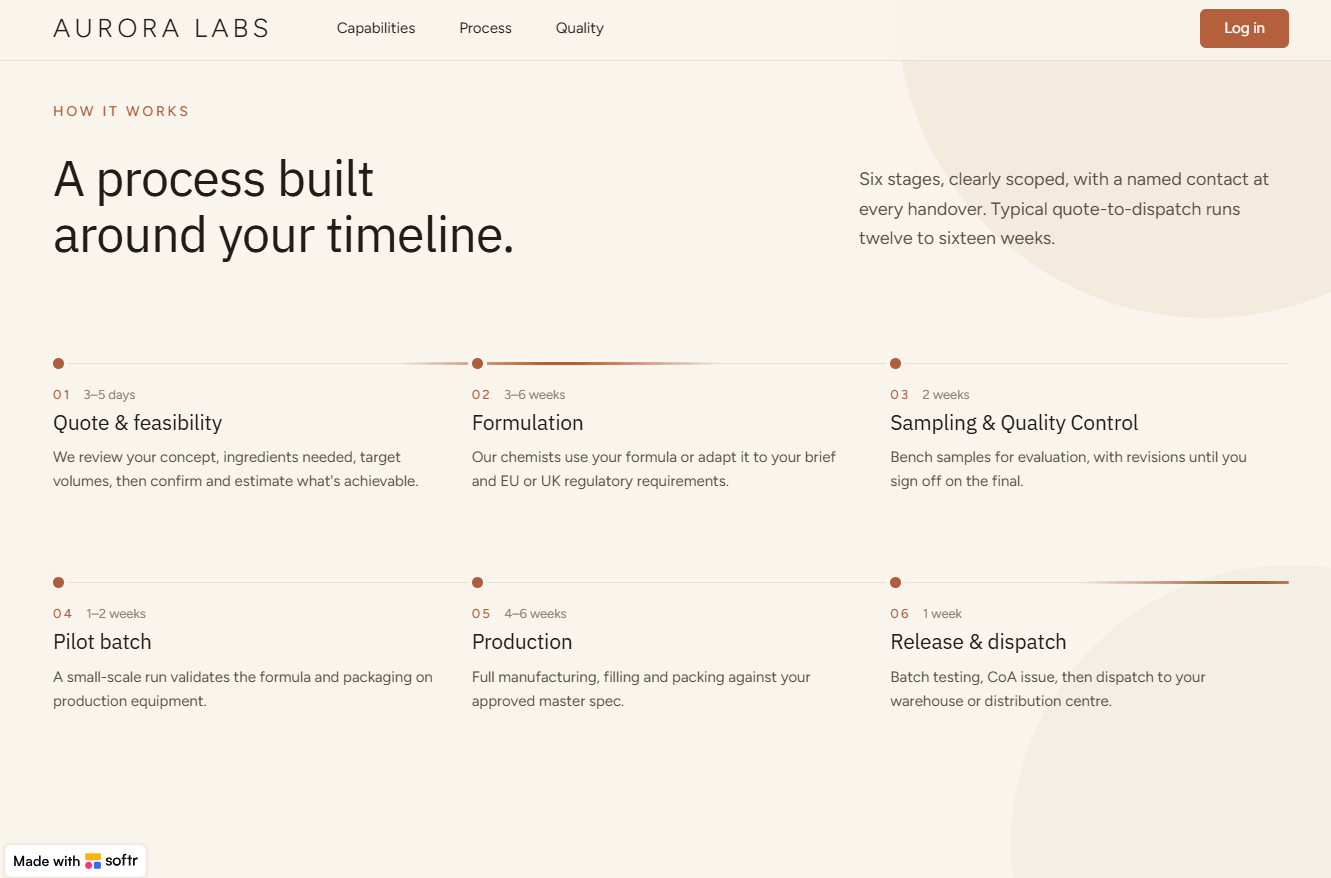
_Another generated block on the same page. A six-column timeline with per-stage durations is exactly the kind of layout that is tedious in a standard block library and quick in a prompt._
## Part 2: Where Vibe Coding Stops — The Request Form
The hero button does not open a generated form. It opens a **standard Softr form block**, and that boundary is deliberate.
The quote request form is long, because contract manufacturing needs a lot of context before anyone can price anything: product categories, quantities, formula status, claims, packaging preferences, timelines, and a free-text requirements field. Softr's conditional logic splits it into steps and shows or hides fields depending on earlier answers, so the customer only ever sees the questions that apply to them.
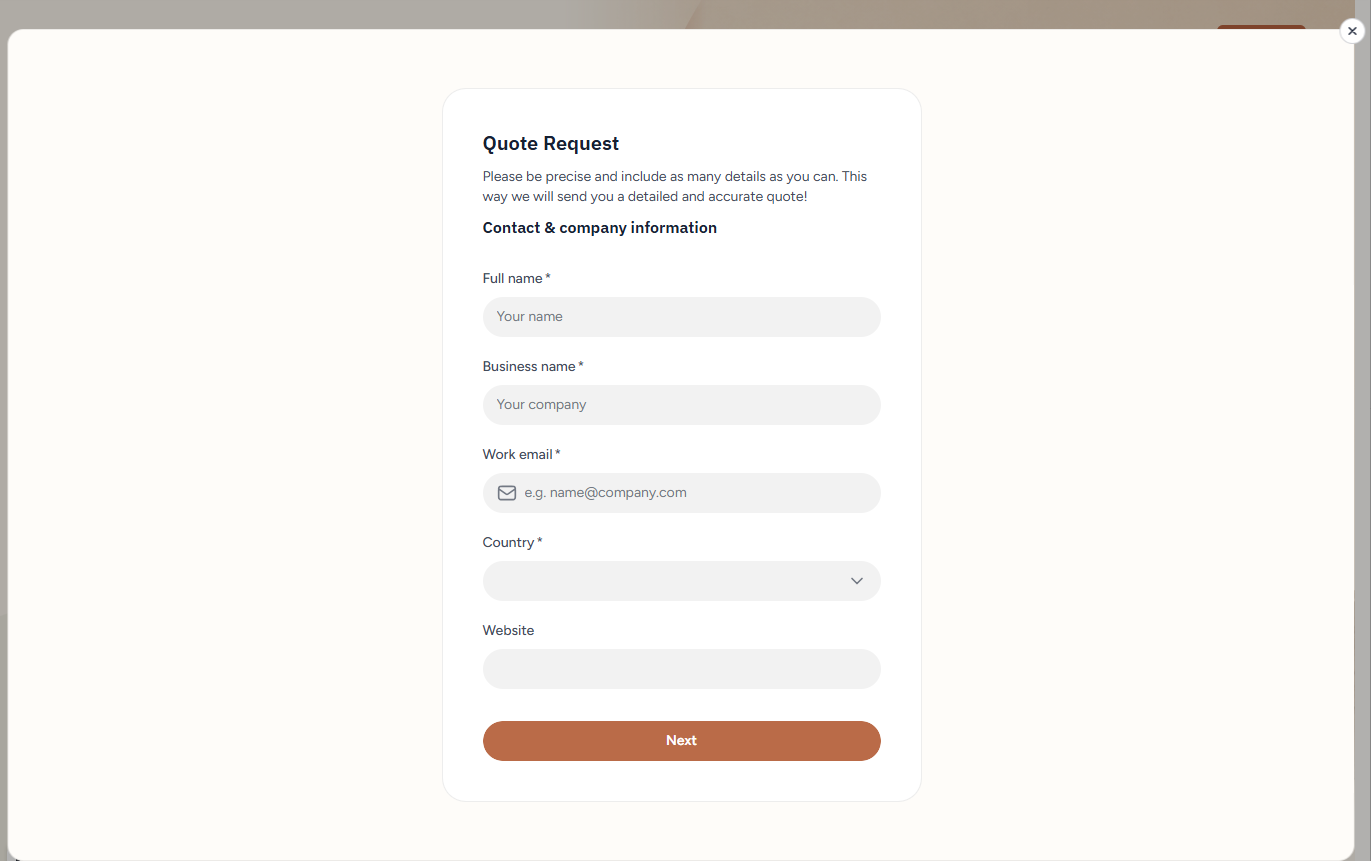
_Step one of the request form: required fields, a typed email input, a country picker, and a Next button. A standard Softr form block, opened from a vibe-coded button._
That form gives you, for free, the things that are genuinely hard to generate reliably:
- **Field validation** that actually blocks a bad submission
- **Typed fields** — dates with a proper picker, numbers, single and multi select, file uploads
- **Multi-step progression** with per-step conditions
- **A guaranteed write** into the right table, with the right relationships
You could vibe code a submission form. You should not. A generated form that silently drops one field in ten is worse than no form at all, and you will not find out from the customer who gave up halfway. Use the tested primitive for the transaction and spend the creative budget on the page around it.
If you are building a comparable intake flow elsewhere, our guide to [creating forms that write into a base](/tutorials/how-to-create-airtable-forms) covers the same design decisions from the Airtable side.
## Part 3: The Intake Workflow
Submitting the form triggers a workflow. Workflows live in their own section of the app, and if you have used Zapier or Airtable automations the layout will be familiar: a list of workflows on the left, the step chain in the middle, and a history of runs on the right — every execution inspectable step by step, with the data that passed through it.
Eight workflows carry the whole system, and the names are the architecture:
| Workflow | Trigger | What it does |
| --- | --- | --- |
| New Quote Request | New record meets conditions | Screens, assigns, drafts the quote lines, notifies both sides |
| Price → Quote Lines | Record change | Prices a line from the standard price list |
| Quote Status → Request Status | Record change | Keeps the originating request in step with its quote |
| Generate PDF → Gamma | Button | Builds the proposal deck through the Gamma API |
| Send Quote | Button | Updates status and emails the customer |
| Quote → Order | Button | Converts an approved quote into an order |
| Pay Order → Stripe | Button | Opens the Stripe payment for that order |
| Stripe → Order Paid | Webhook | Marks the order paid when Stripe confirms |
Three of those are button triggers, one is a webhook, and the rest react to records. That mix is worth noticing: a workflow engine that only fires on record changes cannot give a user a button, and one that cannot receive a webhook cannot hear back from Stripe.
Here is what the intake workflow does.
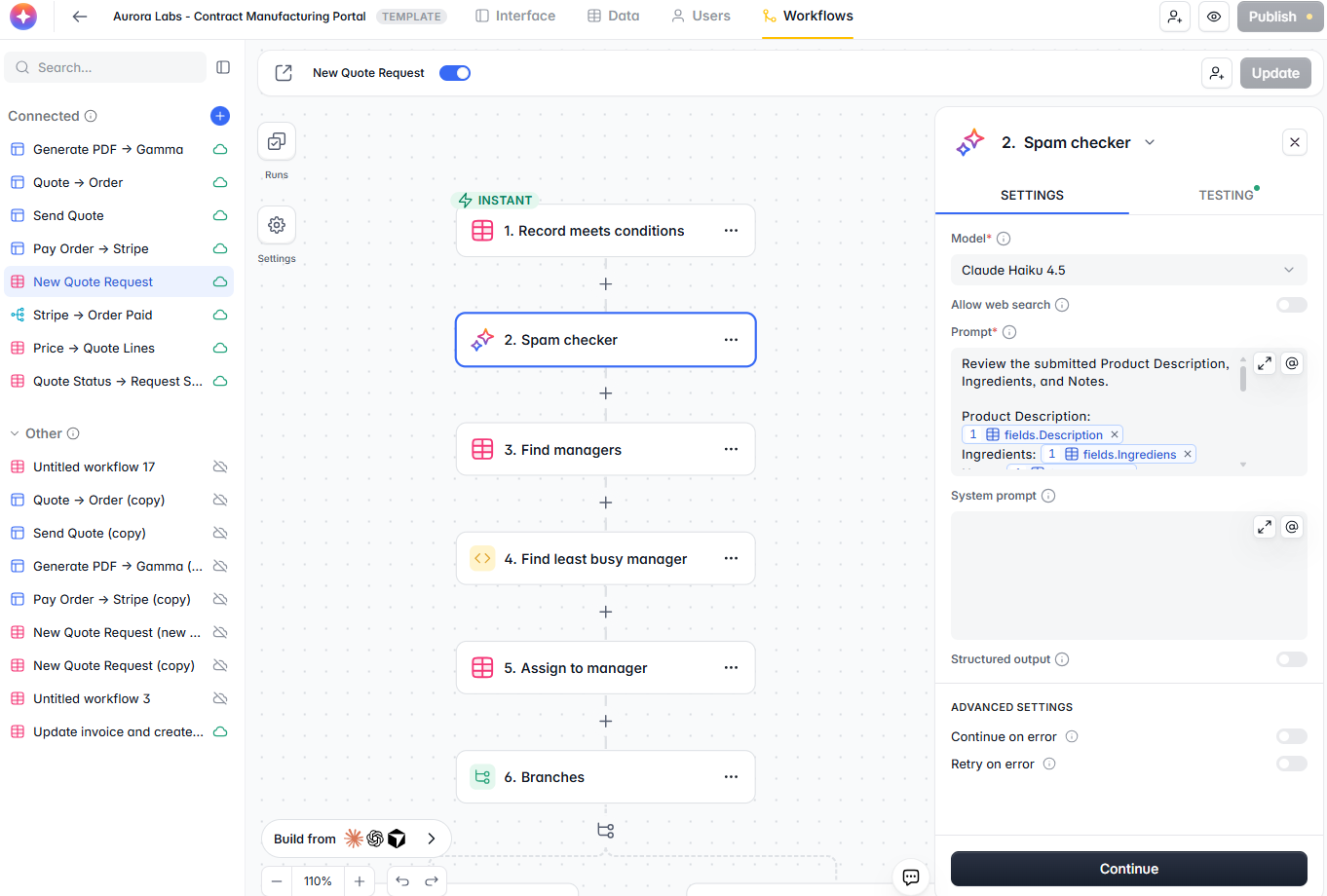
_The intake workflow: an instant trigger, the AI spam check, a manager lookup, a code step, a record update, and a branch. The panel on the right is the AI step — model picker, prompt with record fields dropped in, and a structured output toggle._
### Step 1: Screen the request with AI
The first real step is a spam check. It is an **AI step**, where you pick the model — this one uses Claude Haiku 4.5, because the job is a quick judgement rather than a reasoning problem, and a small model is cheaper and faster. Record fields drop into the prompt the way merge fields do elsewhere in Softr, and a structured output toggle sits underneath for steps that need more than prose back.
It receives the product description, ingredients and notes from the submission, and returns a simple verdict: approved, or spam. Abusive content, nonsense, SEO outreach dressed up as a quote request — all of it gets caught here rather than in an account manager's inbox.
### Step 2: Branch on the verdict
A condition step routes the run. Spam goes down one path, real requests down the other.
The spam path is not a silent delete. It emails the manager a short notice — *this request was rejected as spam* — including the original submission, so the AI's call can be checked, and a button in the email to reverse the decision. Every email step has an HTML preview in the builder, so you see exactly what lands in the inbox before you ship it.
**Never let an AI filter delete things quietly.** A visible rejection with a one-click reversal costs nothing and keeps a false positive from becoming a lost customer.
### Step 3: Assign the least busy account manager
For a legitimate request, the workflow looks up the users who are account managers, then passes them into a **code step**. Softr workflows run JavaScript or Python, and you can ask the built-in AI to draft the code for you.
The code here is small: compare how many open requests each manager is carrying and return the one with the lightest load. The next step writes that manager onto the quote record, alongside whatever other fields you want to set at creation.
Round-robin assignment is one of those jobs that is trivial in code and awkward in pure no-code branching. A code step inside a visual workflow is the right shape for it.
### Step 4: Turn free text into quote lines
This is the most valuable AI step in the build.
The request form's detailed requirements field contains something like *"1400 is total quantity, we need 500 of serum and the rest split 50/50 between toner sizes"*. A human quote builder reads that and produces three line items. An AI step with **structured output** does the same thing: it returns discrete rows with product type, volume and packaging, which the workflow writes as quote lines.
The prompt is long, and it needs to be. It describes the output format precisely, because customers do not write requirements in a schema. What comes back is not prose about the request — it is the quote, pre-built, waiting for a human to check it.
### Step 5: Two emails
A successful run ends with two messages: a confirmation to the customer that their request has been received, and a notification to the assigned account manager with a link into the admin portal.
## Part 4: The Softr Database
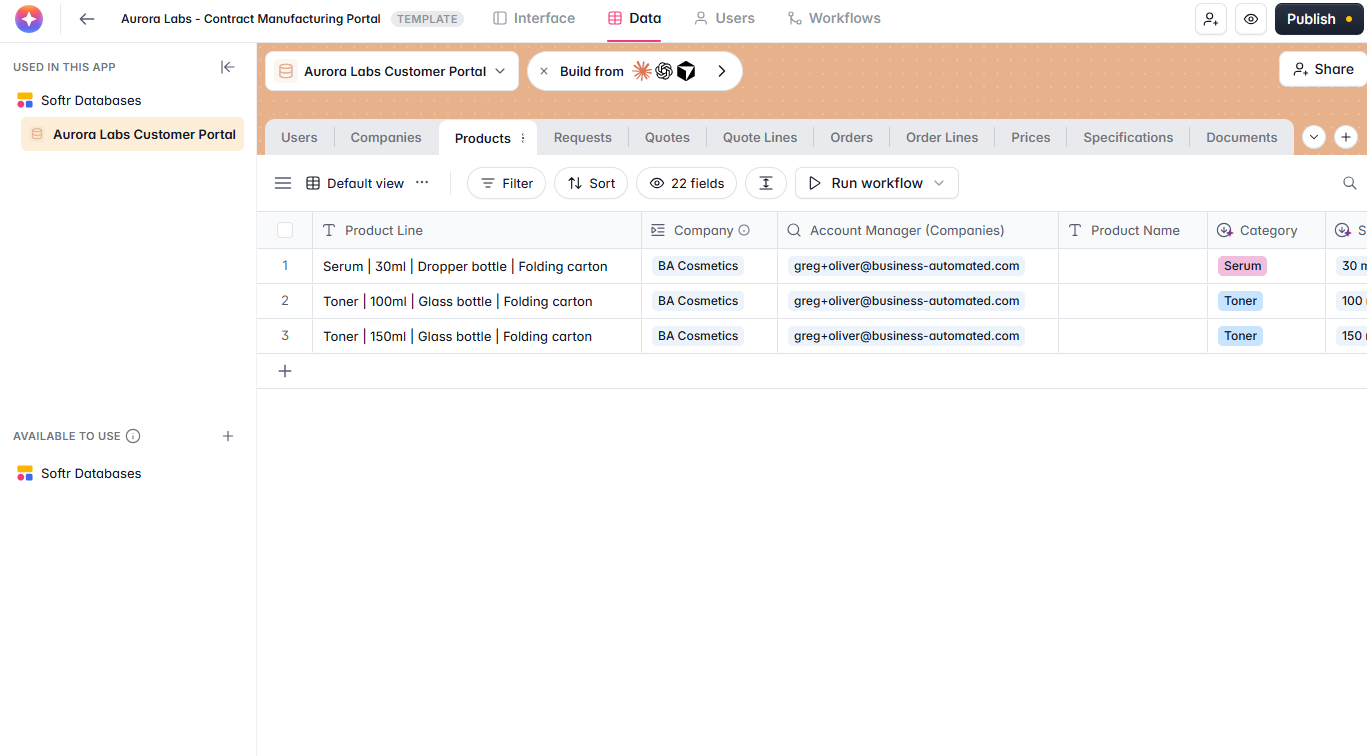
_The Data tab of the app: users, companies, products, requests, quotes, quote lines, orders, order lines, prices, specifications and documents — all native Softr tables._
Behind all of this sits a Softr database with a tab per table: users, companies, products, requests, quotes, quote lines, orders, order lines, prices, specifications and documents.
This is the system of record for the whole business, and you can work in it directly — change a quantity, correct a price, fix a link. In practice nobody should, and that is the point of the next section. The grid is where data lives; the portal is where work happens.
Two tables deserve attention:
- **Prices** is the standard price list. Because quote lines pull from it, quoting is a lookup rather than a memory exercise, and a price change propagates to every new quote at once.
- **Products** carries the SKU definitions — product line, category, size, packaging — which is what makes a line item meaningful rather than a sentence.
## Part 5: The Account Manager Portal
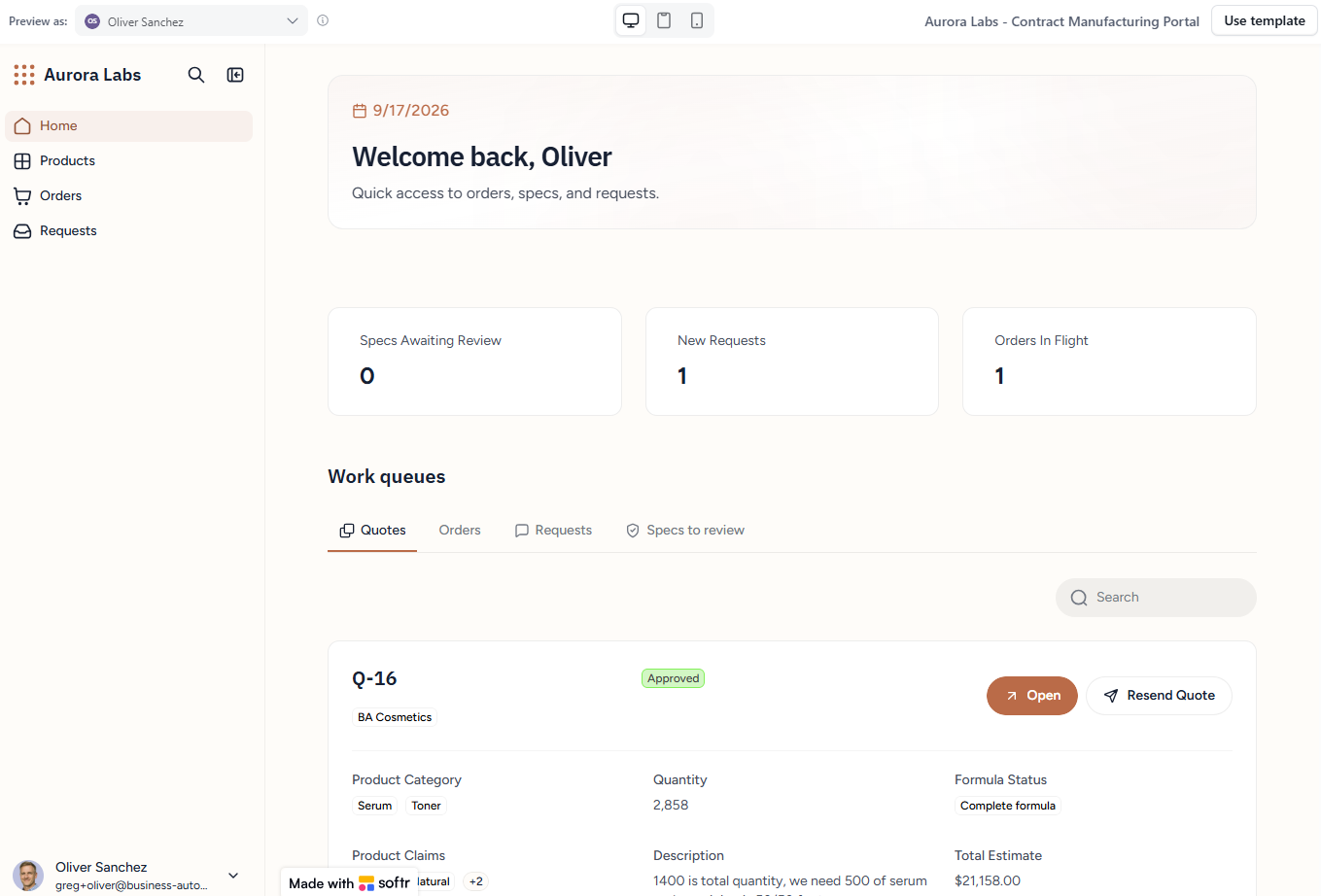
_Oliver's home page. The quote the intake workflow created is already in his queue, with the customer's own words visible on the card._
Previewed as Oliver, one of the account managers, the internal portal opens on a home page with three KPI tiles — specs awaiting review, new requests, orders in flight — and tabbed work queues underneath for quotes, orders, requests and specs to review. The quote the workflow just created is already in his queue, because the workflow assigned it to him.
A few things this layer does that a grid cannot.
**Ask AI on a record.** A request can be summarised on demand — what was asked for, when, what it contains — with follow-up questions in the same thread. Useful when you inherit a request from a colleague and do not want to read four screens of form answers.
**Status changes in one click.** Opening the request and moving it to *In progress* takes a click, and everyone looking at the same record sees it.
**A comment thread per record.** Because the customer was invited into the portal, the manager can tag them directly on the quote, ask a clarifying question, and attach files. The customer gets a notification and replies in the same thread. The alternative — an email chain that only two people can see and nobody can find in six months — is the thing this replaces.
### Building the quote
The quote opens with line items already populated: quantities extracted by the AI step, prices pulled from the standard price list. The manager's job is to check and adjust, not to type.
Everything is editable inline. Add a line, delete a line, change a quantity, override a price. In the video the only manual addition is a sample quantity, because how many samples a client gets before a production run is a judgement call rather than a rule.
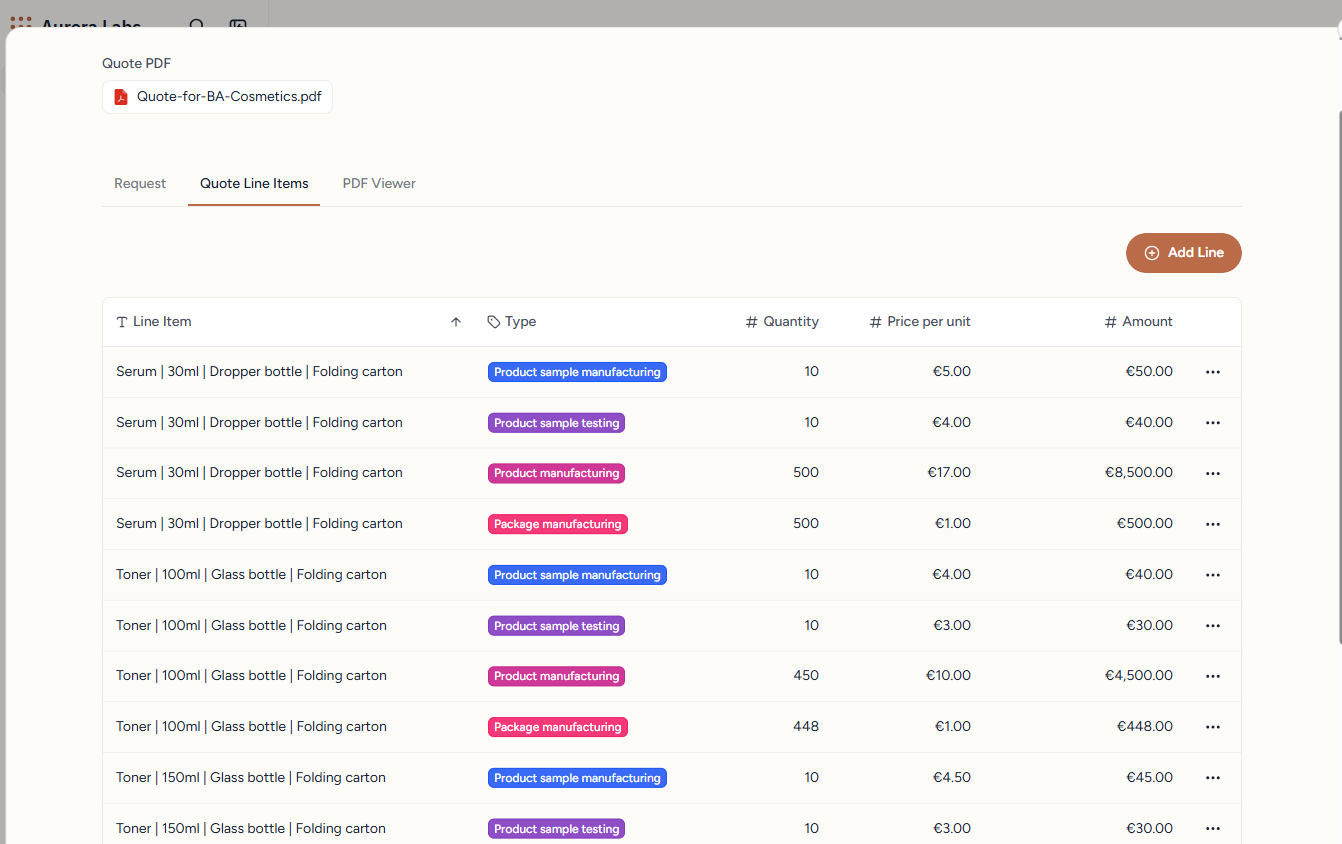
_Quote lines built by the workflow: sample manufacturing, sample testing, product manufacturing and package manufacturing for each SKU, priced per unit from the price list. Add Line, inline edits and per-row actions are all in the portal._
That is the correct division of labour. The system does the mechanical assembly; the human makes the commercial decisions.
## Part 6: The Proposal Deck, via Gamma
A quote that is ready to send becomes a PDF with one button — and the PDF is not a template merge, it is a designed deck produced by [Gamma](https://gamma.app/?utm_source=business-automated) through its API.
### The template carries the instructions
In Gamma there is a saved template for the proposal, and each page carries a note about what should happen to it:
- **Cover page** — update the client name only
- **Summary page** — update the total amount and the lead time
- **Process and capability pages** — common to every quote, update from the data provided
- **Locked slides** — certifications, quality standards, terms — not to be edited at all
Locking the slides that must not change is what makes this safe to run unattended. The parts of a proposal that carry legal or compliance weight stay fixed; only the commercial detail varies.
### The workflow behind the button
Pressing *Generate PDF* starts a second workflow:
1. Update the record status so the page reflects that generation is running.
2. Find every quote line belonging to this quote.
3. Make a **custom API call** — a POST to the Gamma API with the account credentials, referencing the template and passing the client name, total quantity, total estimate, account manager and the line item detail.
4. Wait — generation takes about four minutes.
5. Update the record and refresh the page, so the button becomes *Send quote*.
The custom API step is the quiet headline here. Softr workflows can call any HTTP API, which means the platform's own feature list stops being the limit of what your app can do. Anything with an endpoint — a PDF service, a shipping rate API, an ERP, an internal system — becomes a step in a workflow.
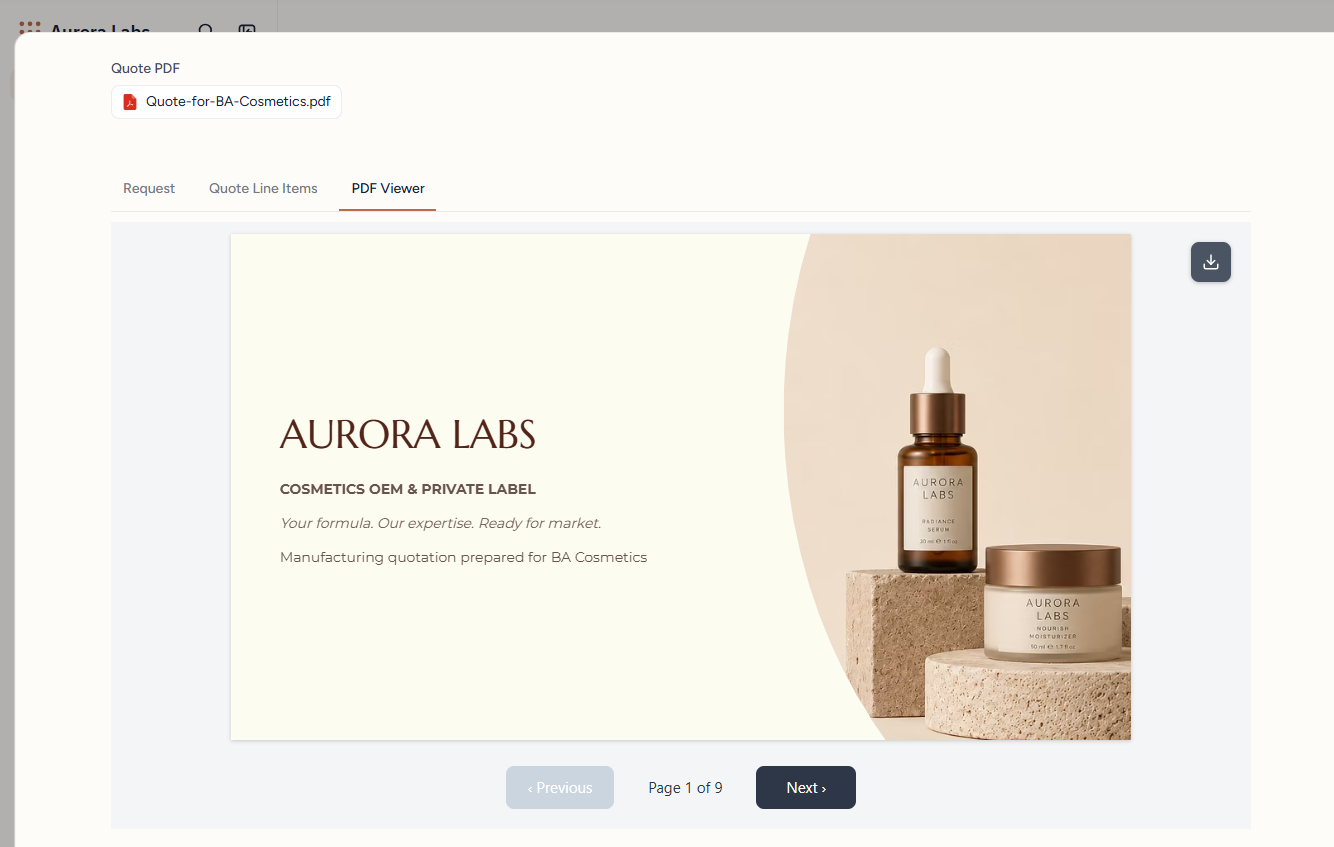
_The finished deck, attached to the quote and previewed in the portal — nine pages, cover personalised to the client, downloadable by the customer from their own portal._
The generated deck comes back with the three SKUs, the correct total quantity and value, the process pages untouched, and the account manager's name on the closing slide. We have built the same pattern on a different stack in [automated proposals with AI, Airtable and Gamma](/tutorials/automated-proposals-ai-airtable-gamma), and if you want the plain-document route instead, [generating PDFs](/tutorials/airtable-generate-pdfs-guide) covers the alternatives.
### Sending it
*Send quote* runs a third workflow: a button trigger, a status update, and a Gmail step that emails the customer with a link into their portal. There is a resend option, and the manager can tag the customer in the comment thread at the same time.
## Part 7: The Customer Side
The customer clicks the link in their email and lands directly on the quote page inside their own portal — a different set of pages, filtered by permissions to their company's records only.
What they can do there:
- **Read the proposal** in an embedded viewer, or download it
- **See the line item detail** and the original request, as a reminder of what they asked for
- **Reply in the comment thread**, and tag other people on the project, including other managers at the manufacturer
- **Approve the quote**, which creates an order
Approval is the state change that matters. An order appears on the manager's side immediately, and both parties are now looking at the same record.
### Paying
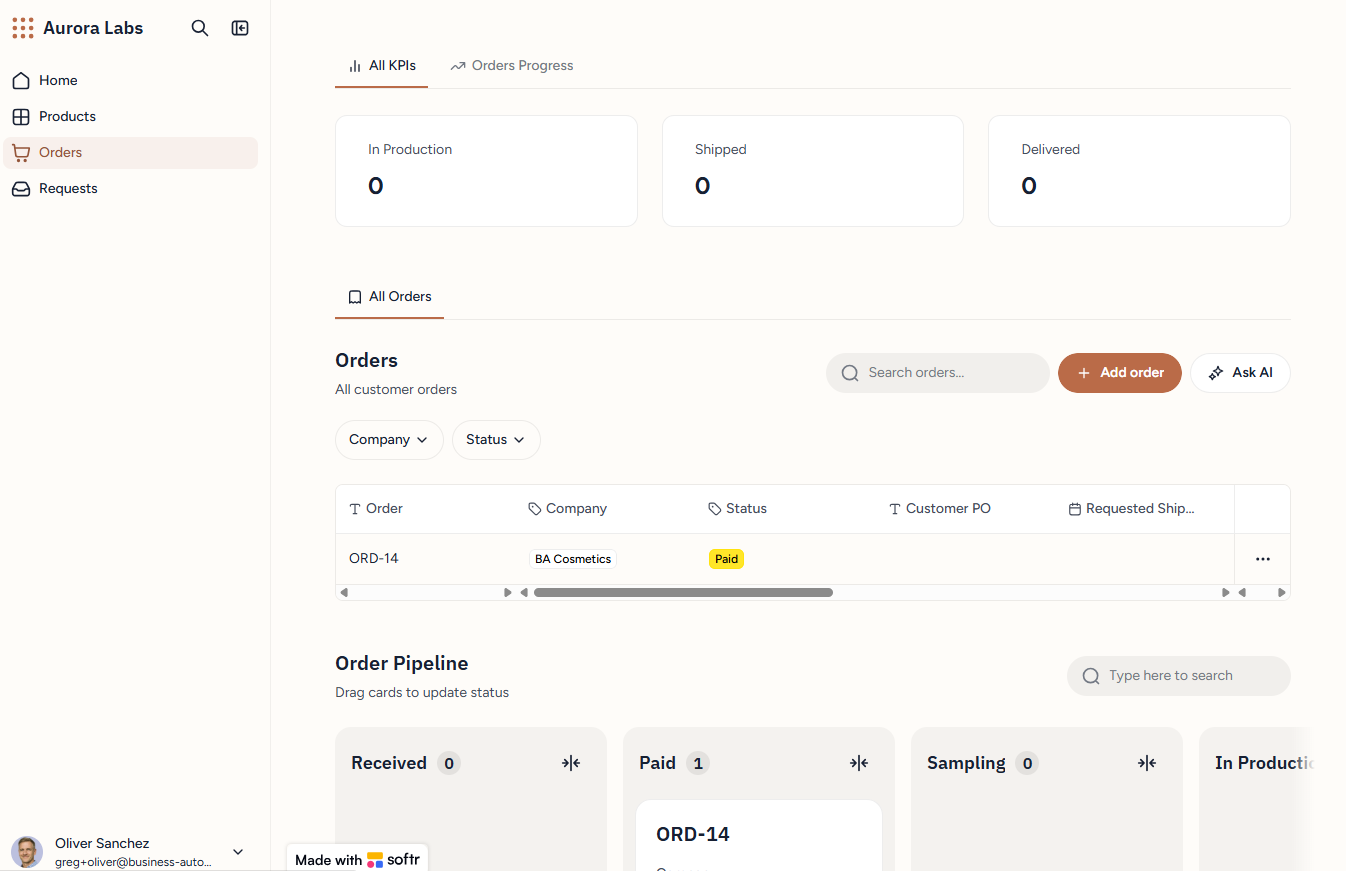
_The order lands in the pipeline as Paid. Production status is a card you drag, and the customer sees the result of that drag in their own portal._
The customer clicks *Pay for this order* and gets a [Stripe](/tools/stripe) payment page. After paying they are redirected back into the portal, where the order shows as paid — and it shows as paid on the manager's order pipeline at the same time. That second half is a workflow of its own: Stripe calls a webhook URL, the workflow finds the matching order and updates its status, so the confirmation does not depend on the customer's browser making it back. A manager can also mark an order paid manually, for customers who pay by bank transfer.
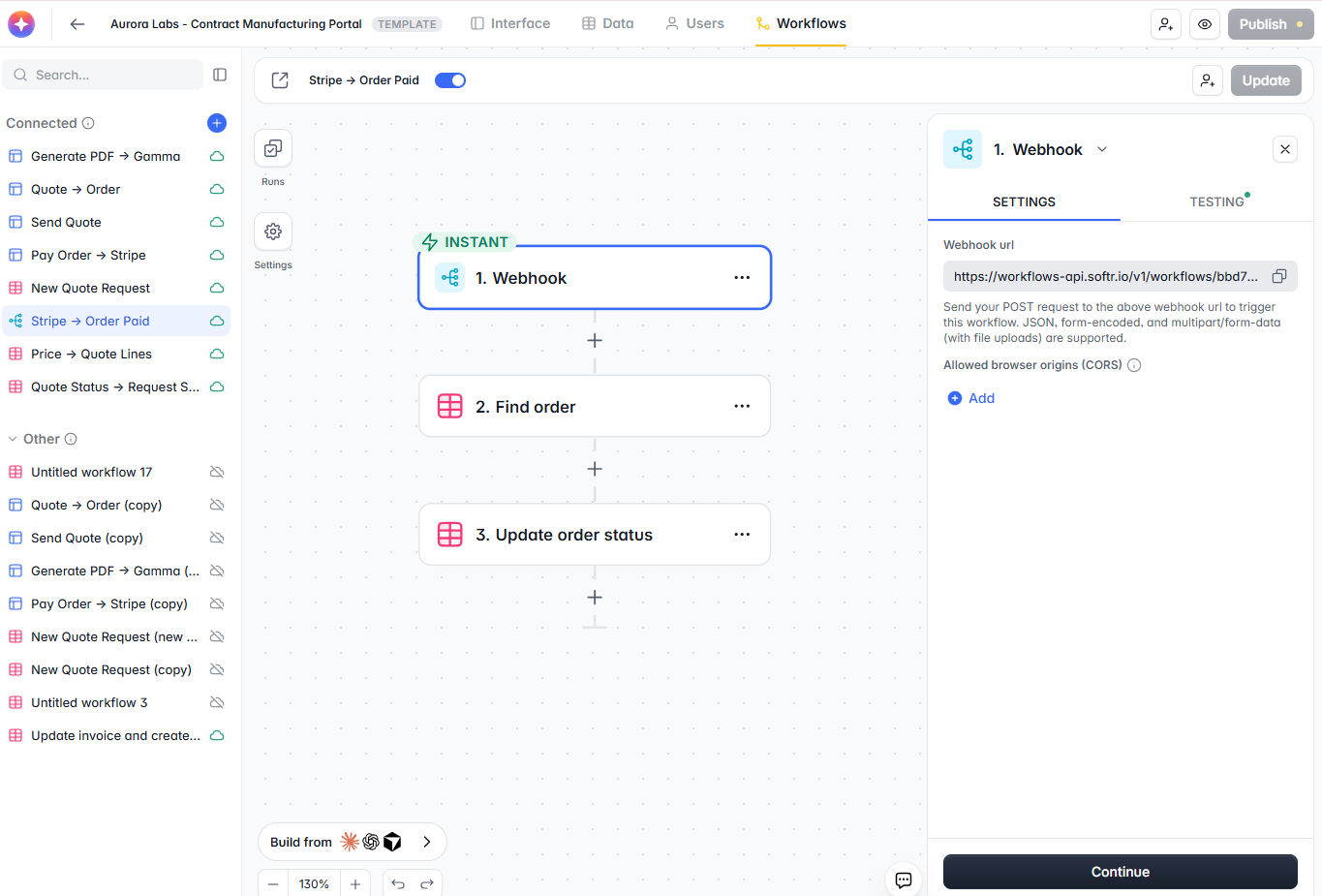
_The write-back: Stripe posts to a workflow webhook URL, the workflow finds the matching order and updates its status. Three steps, and neither side has to refresh anything manually._
From there the order becomes the working record: the customer adds a shipping address, sees per-item fulfilment status as production progresses, and keeps commenting in the same thread. The manager's pipeline is a kanban board — received, paid, sampling, in production, shipped, delivered — that updates by dragging a card.
For the payment mechanics in a different stack, see [Stripe checkout links with dynamic pricing](/tutorials/stripe-checkout-links-dynamic-pricing-airtable-make).
## Where to Draw the Vibe Coding Line
This is the argument the whole build makes, and it is worth stating on its own.
**Vibe code the presentation layer.** Landing pages, marketing sections, unusual layouts, anything where the requirement is "make it look like this and I will know it when I see it". Failure here is visible and cosmetic. You look at it, you do not like it, you prompt again.
**Use tested components for the transaction layer.** Forms, validation, permissions, payments, background processes. Failure here is invisible and expensive: a dropped field, a permission that leaks one customer's quote to another, a payment that does not write back. You find out weeks later, from the customer.
**Use workflows for anything that runs without a person watching.** The decisive feature is not that they are visual. It is the run history — every execution, every step, every payload, inspectable after the fact. When a quote does not reach a customer, you open the run and see which step failed. Generated code gives you a stack trace at best and silence at worst.
Softr happens to be one of the few places where all three live in one app, which is why the split is practical rather than theoretical. You are not integrating three products — you are choosing the right block type on the same page.
## Where This Pattern Fits Beyond Cosmetics
Strip out the serums and toners and the structure is generic: a quote request with complex requirements, a price list, a proposal that has to look professional, an approval, a payment, and a production order that both sides need to watch.
- **Contract and private label manufacturing** — cosmetics, supplements, food and beverage co-packing
- **Packaging and print** — where every quote is a configuration of size, material, finish and run length
- **Job shops and CNC machining** — drawings in, quoted line items out, production status visible to the customer
- **Apparel and promotional products** — sizes, colourways, decoration methods and sample rounds
- **Testing labs and certification bodies** — sample intake, scoped quotes, documented results
- **Equipment and systems integrators** — configured bills of materials and staged delivery
The [manufacturing solutions](/solutions/manufacturing) page covers how we structure this kind of back office, and the [client portal builder](/solutions/client-portal-builder) page covers the customer-facing half. If your back end is already Airtable, [building a client portal with Airtable and Softr](/tutorials/build-client-portal-airtable-softr) is the same portal pattern against that database, and the [order management system](/tutorials/airtable-order-management-system) guide covers the fulfilment tables in more depth.
## Build It Yourself: The Sequence
1. **Model the database first.** Products, prices, requests, quotes, quote lines, orders, order lines. Line items are their own table — a quote with its products in a text field cannot be priced, summed or fulfilled.
2. **Load a real price list.** Quoting only becomes automatic when prices are data.
3. **Build the request form as a standard form block**, with conditional steps, and include one free-text requirements field for the AI to parse.
4. **Vibe code the public page around it**, connect it to whatever data it should display, and link its call-to-action to the form page.
5. **Write the intake workflow**: trigger on new request, AI spam check, branch, assign a manager with a code step, AI structured output into quote lines, notify both sides.
6. **Build the internal portal** as work queues rather than tables — what is mine, what is waiting, what is overdue.
7. **Make quote lines editable inline.** The manager adjusts; they should never open the database to do it.
8. **Add the proposal workflow**: gather lines, custom API call to Gamma with a template that has per-slide instructions and locked slides, wait, update, refresh.
9. **Invite customers into their own portal** with permissions scoped to their company, and keep every conversation on the record it belongs to.
10. **Wire Stripe to the order**, and let approval be the event that creates it.
11. **Test the whole chain end to end as each role** — prospect, manager, customer — before anyone real touches it. Run history makes this fast.
## When to Get Help
This is a large system, and the video compresses weeks of design decisions into twenty minutes. Bringing in help usually makes sense when:
- Quoting depends on rules more complex than a price per unit — tiered pricing, minimum order quantities, tooling and setup charges, currency
- The portal has to exchange data with an ERP, MRP or accounting system rather than stand alone
- Specifications, formulas or regulatory documents need version control and an audit trail
- Multiple roles need genuinely different views — sales, production, quality, finance — with permissions that must hold
- You already have a back end in Airtable or Supabase and want the Softr layer on top of it without a migration
We build systems like this one — portals, quoting engines, document automation and the workflows underneath them. [Talk to our Softr team](/softr-expert) if you want this adapted to your own product line and process.
## Next Steps
- Watch the [full build](https://youtu.be/T-gSpVMO7QQ) once end to end before copying anything, so the sequence makes sense
- Copy the [template](https://dub.sh/softr-portal) and replace the products and price list with your own before changing anything else
- Add one AI step to a workflow you already have — a spam check is the safest first one, because its output is a single word you can verify
- Try the structured output pattern on your own free-text field and compare what it extracts against what a person would have typed
- Read [no-code vs vibe coding](/no-code-vs-vibe-coding) if you are still deciding how much of your system should be generated
The headline is not that Softr added AI. It is that the boring, dependable parts — forms, permissions, workflows with a run history, payments — now sit in the same app as the parts you want to be creative with. That combination is what turns a good-looking landing page into a business that runs on it.
## Sitemap
See the full [sitemap](/sitemap.md) for all pages.